KNOWLEDGE BASE
Release Notes v3.1
FYI: v3.1.1 is just a minor update that fixes some build system issues found in v3.1.0
Fluent Bit is a Fast and Lightweight Telemetry Agent for Linux, BSD, macOS and Windows. We are proud to announce the availability of Fluent Bit v3.1.
    Fluent Bit v3.1.1
    * Copyright (C) 2015-2024 The Fluent Bit Authors
    * Fluent Bit is a CNCF sub-project under the umbrella of Fluentd
    * https://fluentbit.io
    ______ _                  _    ______ _ _           _____  __
    |  ___| |                | |   | ___ (_) |         |____ |/  |
    | |_  | |_   _  ___ _ __ | |_  | |_/ /_| |_  __   __   / /`| |
    |  _| | | | | |/ _ \ '_ \| __| | ___ \ | __| \ \ / /   \ \ | |
    | |   | | |_| |  __/ | | | |_  | |_/ / | |_   \ V /.___/ /_| |_
    \_|   |_|\__,_|\___|_| |_|\__| \____/|_|\__|   \_/ \____(_)___/

    [2024/07/09 12:55:40] [ info] [fluent bit] version=3.1.1, commit=8ed2e80a9e, pid=51082
    [2024/07/09 12:55:40] [ info] [storage] ver=1.5.2, type=memory, sync=normal, checksum=off, max_chunks_up=128
    [2024/07/09 12:55:40] [ info] [cmetrics] version=0.9.1
    [2024/07/09 12:55:40] [ info] [ctraces ] version=0.5.1
    [2024/07/09 12:55:40] [ info] [sp] stream processor started
For people upgrading from previous versions you must read the Upgrading Notes section of our documentation:
https://docs.fluentbit.io/manual/3.1/installation/upgrade_notes
Introduction
Fluent Bit, a CNCF graduated project under the umbrella of Fluentd, announces the availability of v3.1.
In every release, there are many improvements and fixes, on these notes we will refer to the major changes that will make your infrastructure happier ;)
Below a list of the highlights of this release:
LuaJIT Upgrade (scripting)
One of the powerful features of Fluent Bit, is the ability to provide the user an interface to control how to modify their telemetry data by using a very simple, but powerful, scripting language: Lua. Our Lua interface is powered by LuaJIT library, this has not been upgraded in the last two years, primary because it has been very stable for a long time.
In this release, we are upgrading to the latest of LuaJIT which brings overall architecture improvements and extended support for Windows on ARM.
If you are curious to learn how to use Lua, just copy the following configuration file and see how a simple dumy message can be modified inline in the config with some embedded Lua code:
|
|
You can also have your Lua code in a separate file, just read more about the Lua in our documentation.
Add support for local/system timezone on parsing
When parsing log record dates, there are cases when the date string don’t contain any relevant information about the timezone it was generated, however is ideal to assume those records were generated in the local system so it’s parsing should assume the local timezone set in the operating system.
This change introduces a new configuration flag for the parsers section called time_system_timezone (default: off) that allows to use system timezone (mktime(3)) for date representation.
The following configuration snippet provides an example of it (note this is in classic config mode):
|
|
Networking
In this release we did some small changes to our networking stack.
Configurable KeepAlive for Downstream based input plugins
Downstream is an internal interface to allow to recieve TCP connections. In this release we added a new configuration flag to control manually the keepalive functionality (this allows to have persistent TCP connection), the new option available is net.keepalive (default: on).
Users of this interface are the input plugins such as HTTP, OpenTelemetry, Elasticsearch, Splunk, etc.
TLS Hostname verification
When performing TLS connections, the default verification is for the certificates. In this new release, we added a new check to verify the hostname associated to the certificates through the new option tls.verify_hostname (default: off).
Note that some plugins that uses TLS might have a different default for tls.verify_hostname.
OpenSSL: reduce log noise
A small change to reduce the noise in the TLS logger make sure you don’t get false positives when doing secured sessions backed by OpenSSL.
Core: Log Groups
When input plugins collects or generate log records, usually those are serialized one after each other, the only shared information that existed for records grouped inside a Chunk is the Tag. This simple metadata field is used for routing through the pipeline, however there are cases where we need to set metadata for a group of records, this is where we have implemented the concept of Groups.
A Group is a special record definition that aims to share specific information for all records under that group.
  :---+--------------+---------------------------------------------:
  | 1 | Group        | [ [Group Start, {METADATA}], {GROUP_INFO} ] |
  :---+--------------+---------------------------------------------:
  | 2 | Log Record 1 | [ [TIMESTAMP, {METADATA}], {RECORD} ]       |
  :---+--------------+---------------------------------------------:
  | 3 | Log Record 2 | [ [TIMESTAMP, {METADATA}], {RECORD} ]       |
  :---+--------------+---------------------------------------------:
  | 4 | Log Record N | [ [TIMESTAMP, {METADATA}], {RECORD} ]       |
  :---+--------------+---------------------------------------------:
  | 5 | Group        | [ [Group End, {}], {} ]                     |
  '---'--------------'---------------------------------------------'
As of now, the only components of plugins generating or consuming those groups are OpenTelemetry input and OpenTelemetry output. This aims to address some issues we had handling OTel Logs metadata.
Processors
Processors are the new way to do data processing or filtering. In this release we are announcing the following changes for end users interested in OpenTelemetry log processing:
- OpenTelemetry Envelope
- Content Modifier contexts for OpenTelemetry logs
OpenTelemetry Envelope
When the source of data generated comes from an OpenTelemetry SDK, it comes already formatted with the expected schema, however for the majority of cases where the data does not come from an OTel instrumented application and the destination is an OpenTelemetry endpoint, we need to format the data accordingly.
OpenTelemetry Envelope is a new processor that puts in place the minimum data structure for Log records that are not coming from a native OTel instrumented application, making it easier to process it and deliver it to an OpenTelemetry endpoint.
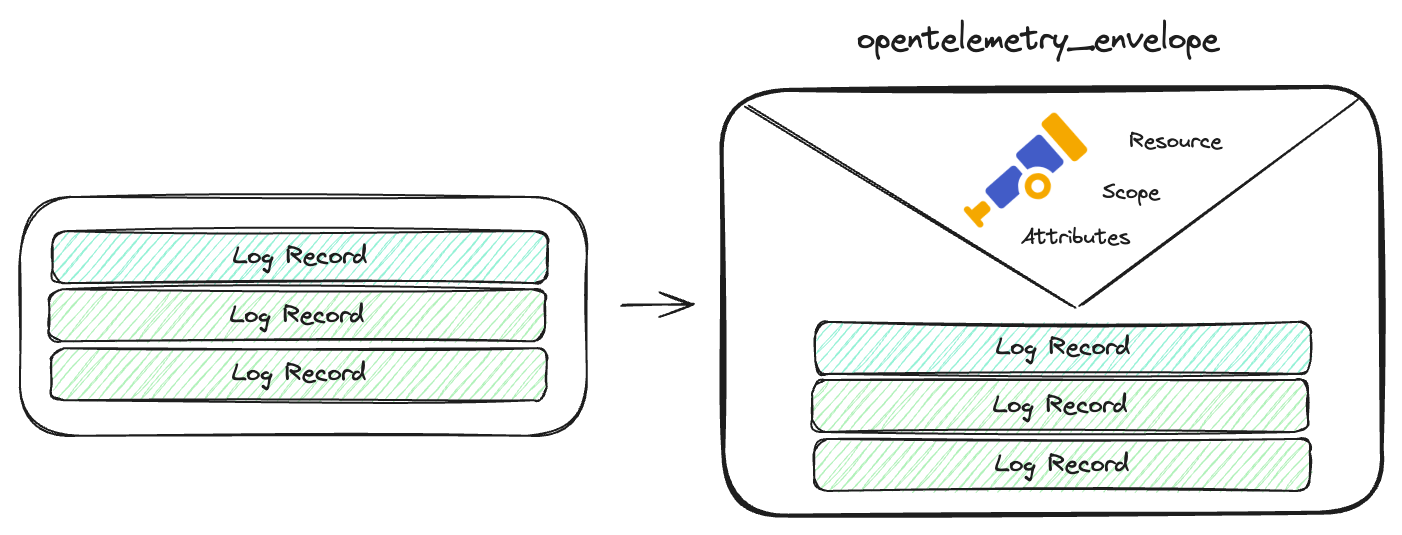
Here is a simple example on how to use it:
|
|
Content Modifier for OpenTelemetry
This new processor introduced recently in v3 series, provides similar functionality exposed by filters to modify or alter the content of records. This time we have extended Content Modifier processor to allow to perform modifications on different parts of OpenTelemetry Logs schema, the following new contexts are supported
| Context | Description |
|---|---|
otel_resource_attributes |
alter resource attributes |
otel_scope_name |
manipulate the scope name |
otel_scope_version |
manipulate the scope version |
otel_scope_attributes |
alter the scope attributes |
In this example, we are using OpenTelemetry Envelope processor and Content Modifier, to alter the Log resource and Scope attributes:
|
|
Contributors
On every release, there are many people involved doing contributions to different areas like bug reporting, troubleshooting, documentation and coding, without these contributions from the community, the project won’t be the same and won’t be in the good shape that it is now. So THANK YOU! to everyone who takes part of this journey!
Join us
We want to hear about you, our community is growing, and you can be part of it!, you can contact us at:
- Github: http://github.com/fluent/fluent-bit
- Slack: http://slack.fluentd.org
- Twitter: @fluentbit